

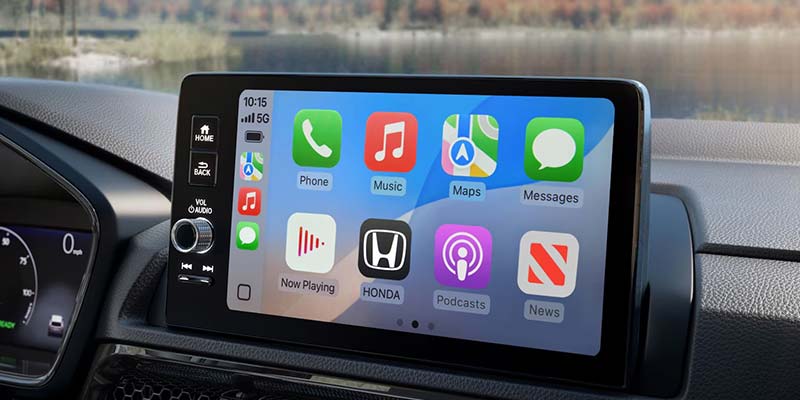
Connecting Apple CarPlay® in a new Honda is one of those small setup steps that pays off every time you drive. It brings navigation, calls, messages, and music into one clean interface on your dashboard, reducing distraction while making daily driving easier. For drivers around Ashland, WI, it’s a simple upgrade that quickly becomes second nature.
Once connected, Apple CarPlay® mirrors key iPhone functions through your Honda’s infotainment system, allowing you to stay connected without juggling your phone behind the wheel.
Why Apple CarPlay® Works So Well in Honda Vehicles
Apple CarPlay® isn’t about novelty—it’s about usability. Honda’s infotainment layouts are designed to make the system intuitive from the first drive.
- Hands-free communication keeps calls and messages manageable using Siri voice control
- Clear navigation through Apple Maps or compatible apps with real-time traffic updates
- Simple media access for music, podcasts, and audiobooks
- Reduced distraction thanks to large icons and voice-first operation
At Marthaler Honda, many drivers are surprised by how quickly Apple CarPlay® becomes part of their everyday routine.
Setting Up Apple CarPlay® in Your Honda
Getting Apple CarPlay® up and running takes only a few minutes. Most recent Honda models—including the Accord, CR-V, and Civic—support either wired or wireless CarPlay®.
- Confirm compatibility
Most current Honda models include Apple CarPlay® as standard equipment.
- Prepare your iPhone
Make sure your iPhone is updated to the latest iOS version and that Siri is enabled.
- Connect your device
Depending on your model, connect using a USB cable or pair wirelessly through Bluetooth. For wired setups, use the USB port marked with the smartphone icon.
- Activate CarPlay® on the screen
From the vehicle’s settings menu, select Apple CarPlay® and follow the on-screen prompts.
- Approve permissions
Accept the connection request on your iPhone to allow access to supported apps.
Once connected, familiar apps like Messages, Maps, Spotify, and Waze appear directly on the center display.
Solving Common Apple CarPlay® Issues
Apple CarPlay® is reliable, but occasional hiccups can happen.
If the connection drops, try a different USB cable or re-pair the device wirelessly. If the screen becomes unresponsive, restarting both the vehicle system and your iPhone often resolves the issue. App-specific problems are usually fixed by updating the app through your phone.
For hands-on help, the team at Marthaler Honda Ashland can walk you through setup or troubleshooting during a service visit.
Get the Most Out of Your Honda Technology
Apple CarPlay® transforms how you interact with your Honda on every drive—from short errands to longer trips out of town. It’s a practical feature that improves safety, convenience, and overall driving comfort.
If you need assistance setting it up or want to explore Honda models equipped with Apple CarPlay®, stop by Marthaler Honda in Ashland, WI. A quick setup today makes every drive smoother tomorrow.
Connect with us


- 2026 Fuel-Efficient Honda
- 2026 Honda Accord
- 2026 Honda Accord Hybrid
- 2026 Honda Accord Trim Levels
- 2026 Honda Civic
- 2026 Honda Civic Ashland, WI
- 2026 Honda Civic Hatchback Hybrid
- 2026 Honda Civic Sedan Hybrid
- 2026 Honda Civic Trim Levels
- 2026 Honda CR-V
- 2026 Honda CR-V Hybrid
- 2026 Honda CR-V vs 2026 Honda HR-V
- 2026 Honda HR-V
- 2026 Honda HR-V Interior
- 2026 Honda HR-V Trim Levels
- 2026 Honda Hybrid Ashland, WI
- 2026 Honda Hybrid Models
- 2026 Honda Odyssey
- 2026 Honda Odyssey Ashland, WI
- 2026 Honda Passport
- 2026 Honda Pilot
- 2026 Honda Pilot Trim Levels
- 2026 Honda Prelude
- 2026 Honda Prologue
- 2026 Honda Ridgeline
- 2026 Honda Ridgeline Trim Levels
- 2026 Honda Sedans
- 2026 Honda Tech Features
- 2026 Honda Technology
- 2026 Honda Warranty
- 2026 Model Year
- 3-Row SUVs Ashland, WI
- AC Functions
- AC Repair
- Air Filter
- ashland Dealer
- ashland Service
- ashland Used Cars
- Benefits of Honda Hybrids
- Best 2026 Family SUVs
- Best 2026 Honda Sedans
- Best 2026 Honda SUVs
- Best Time to Buy a New Honda
- Best Time to Buy a New Honda in Ashland, WI
- Brake Replacement Ashland, WI
- CPO Honda Ashland, WI
- CPO Vehicles Ashland, WI
- Engine Service Ashland, WI
- Honda 3-Row SUVs Ashland, WI
- Honda AC Maintenance Ashland, WI
- Honda Accord Ashland, WI
- Honda Air Conditioning Maintenance
- Honda Apple Car Play
- Honda Battery
- Honda Battery Ashland, WI
- Honda Brake Tips
- Honda Brakes
- Honda Brakes Ashland, WI
- Honda Certified Pre-Owned
- Honda Check Engine Light
- Honda Check Engine Light Ashland, WI
- Honda Civic Ashland, WI
- Honda Civic Trim Levels Ashland, WI
- Honda CPO Benefits
- Honda CR-V Ashland, WI
- Honda Dealer Ashland, WI
- Honda Engine Service Ashland, WI
- Honda Finance Center Ashland, WI
- Honda HR-V Ashland, WI
- Honda Lease Ashland, WI
- Honda Lease Benefits
- Honda Lease Deals Ashland, WI
- Honda Loan Ashland, WI
- Honda Loan vs. Honda Lease
- Honda Maintenance Ashland, WI
- Honda Odyssey Ashland, WI
- Honda Oil Change Ashland, WI
- Honda Oil Change Tips
- Honda Oil Pressure
- Honda Passport Ashland, WI
- Honda Pilot Ashland, WI
- Honda Ridgeline Ashland, WI
- Honda Ridgeline Trim Levels Ashland
- Honda Service Ashland, WI
- Honda Service Center Ashland, WI
- Honda Service Department Ashland, WI
- Honda Service Pass
- Honda Service Pass Ashland, WI
- Honda Specials Ashland, WI
- Honda SUV For Sale Ashland, WI
- Honda Tires Ashland, WI
- Honda Trade In Ashland, WI
- Honda Windsheild Wipers Ashland, WI
- Honda Winterization Tips
- How Often Should You Replace Your Honda Battery?
- How to Connect Apple CarPlay to Your New Honda
- How to connect your iPhone to your Honda
- How to connect your phone to your Honda
- Marthaler Honda of Ashland
- Marthaler Honda Service
- Minivan Ashland, WI
- New Car Battery Ashland, WI
- New Cars Ashland, WI
- New Honda Cars Ashland, WI
- New Honda HR-V
- New Honda Lease Ashland, WI
- New Honda Sedans Ashland, WI
- New Honda Warranty
- New Trucks Ashland, WI
- New Vehicles
- Oil Change Ashland, WI
- Oil Pressure
- Quality Used Honda in Ashland, WI
- Spring Maintenance
- SUVs For Sale Ashland, WI
- The 2026 Honda Civic
- Tire Shop Ashland, WI
- Tires Ashland, WI
- Used Car Dealer Ashland, WI
- Used Car Trade In Ashland, WI
- Used Cars For Sale in Ashland, WI
- What Is Honda TrailSport?
- What to Do When Your Honda Check Engine Light Appears
- Why Summer is the best time to buy a new vehicle
- Windsheild Wipers Ashland, WI
- Windshield Wipers
- Winter Auto Service Ashland, WI